In many companies the sales plan lives in Excel: the manager updates it on Friday evening, by Monday the numbers are already out of date, and a salesperson learns they are behind only at the end-of-month meeting. When the plan is not visible every day, it does not drive the work — it just records the result after the fact.
In Bitrix24 the plan is set once — for the company, a pipeline or each salesperson — and completion is calculated automatically from won deals. Let’s look at how to set up the plan, how to calculate a number that can actually be achieved, which reports to check every week and which of this is available on bitrix24.kz plans.
Why a plan in Excel doesn’t work
- Actuals are entered by hand. Someone has to collect the amounts from the CRM or 1C and copy them into the table — and that someone is always busy.
- Salespeople can’t see themselves. The table sits with the manager; a salesperson learns they are behind once a month, when it is too late to fix.
- No link to deals. The number in the plan is not clickable — to understand where the gap comes from, you have to dig into the CRM separately.
- The plan and the pipeline live apart. In Excel you cannot see whether there are enough deals in progress for the plan to come together at all.
- Versions diverge. The manager has one table, the director another, and the meeting is spent arguing about numbers instead of actions.
How to set a plan in Bitrix24
The plan is configured in CRM → Analytics → Sales funnel, on the Sales plan tab. Click “Configure plan” and choose four parameters.
| Parameter | Options | Advice |
|---|---|---|
| Period | Month, quarter, half-year, year | Start with a month: salespeople do not feel a quarterly plan until the last two weeks |
| Target | Amount of won deals or their number | For B2B with varying deal sizes — amount; for services with a fixed price — number |
| Plan type | By employees, by pipelines, for the whole company | By employees if everyone has their own client base; by pipelines if the funnels differ |
| Permissions | Who can view and who can edit the plan | Salespeople — view their own plan, the manager — edit |
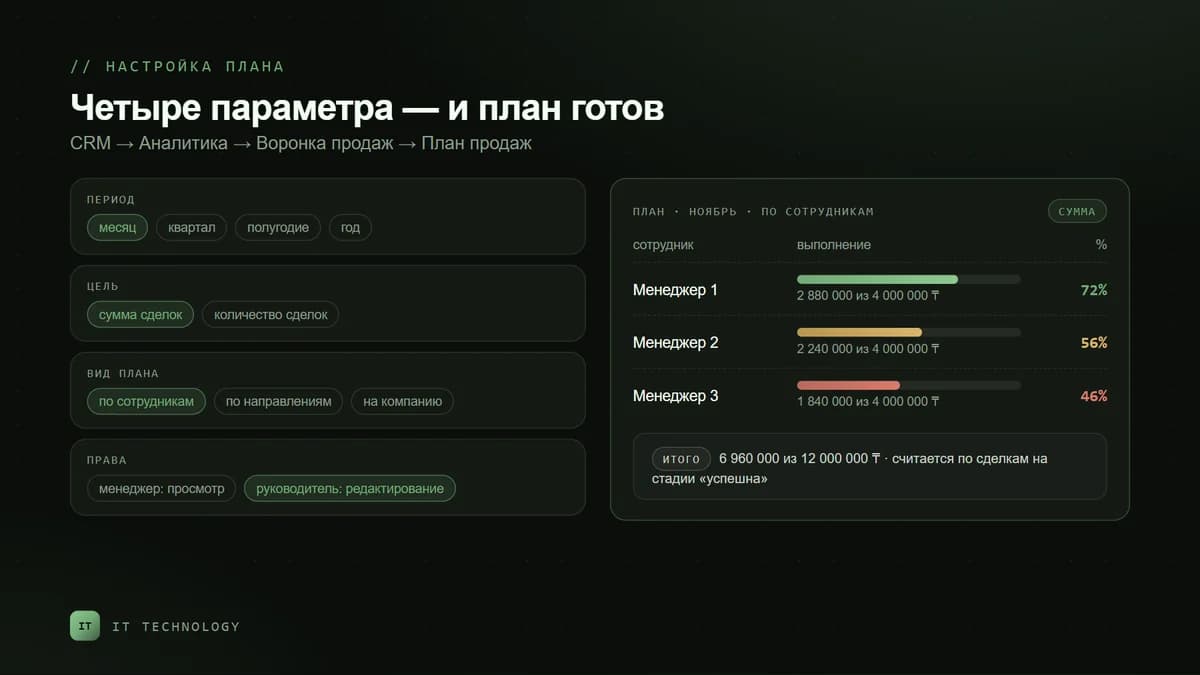
Completion is counted only for deals that reached the “Deal won” stage. So before setting up the plan, make sure salespeople close deals in the CRM and not just issue invoices in 1C: otherwise the plan will show zero despite real sales. How to build a sales funnel from scratch we covered separately, and why CRM revenue does not match 1C — in the reconciliation article.
How to calculate a plan that can be achieved
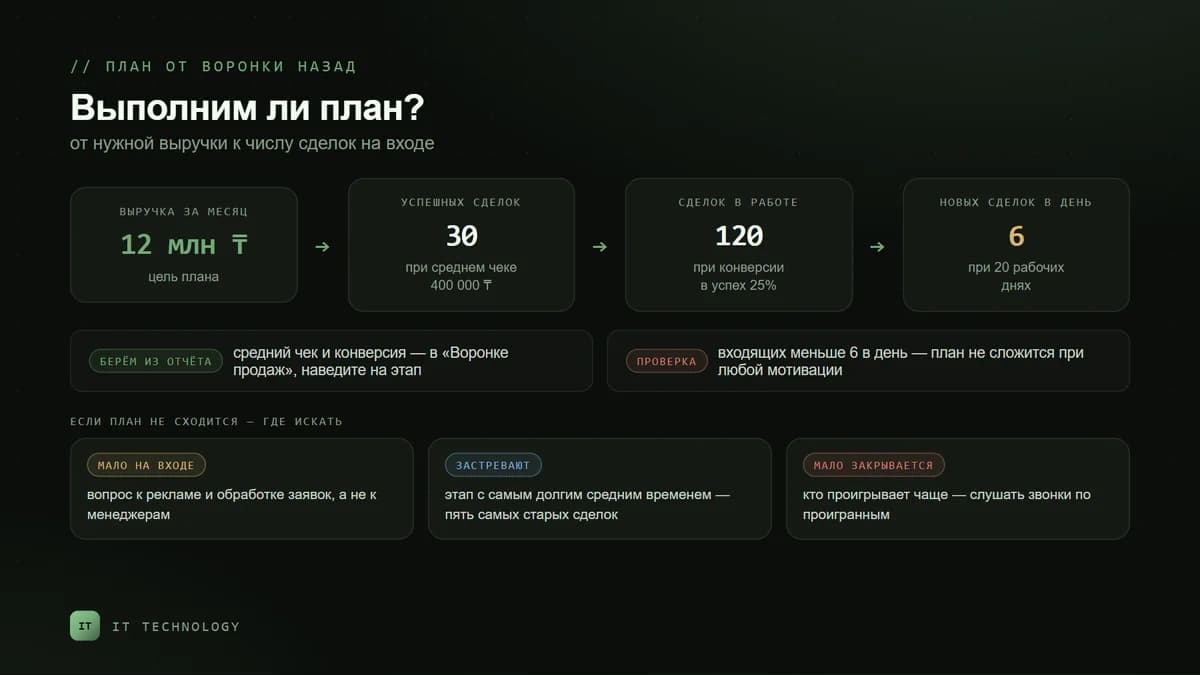
A plan pulled out of thin air is the main reason a team stops looking at it. Calculate it backwards from the funnel: from the revenue you need to the number of deals that must enter the pipeline.
- Revenue needed for the month — for example, 12,000,000 ₸.
- Average deal size for won deals over the last three months — say, 400,000 ₸. So you need 30 won deals.
- Conversion from deal to win — if one in four deals in progress is won, that is 25%, so 120 deals must enter the funnel.
- Check the inflow: 120 deals over 20 working days is 6 new deals a day. If you do not have that many incoming, the plan will not come together with any motivation.
Bitrix24 shows the average deal size and conversion in the Sales funnel report: hover over a stage and you will see the conversion, amount and average time. If the plan for one salesperson comes out several times higher than their result for the last quarter, the number should not be pushed through but broken down: where will the extra deals come from — advertising, dormant clients, repeat sales.
How to track completion every week
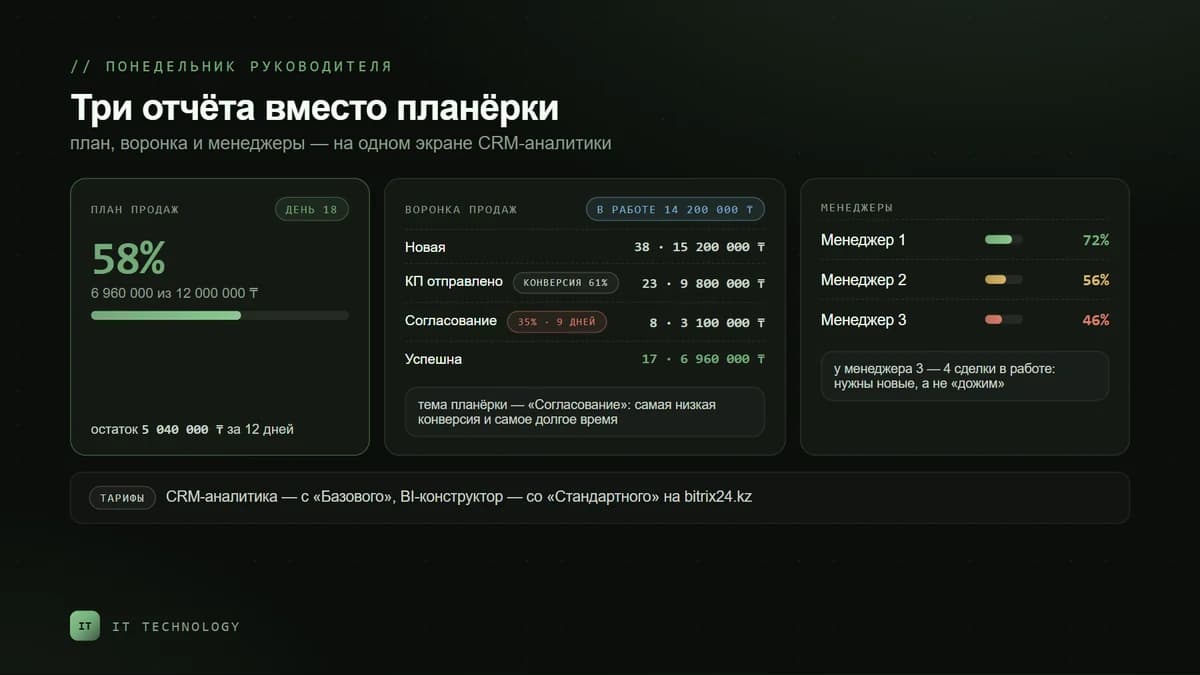
Alongside the plan, CRM analytics has three reports that are enough for weekly control: the Sales funnel with the manager effectiveness table, Sales dynamics with the share of repeat sales, and Period comparison — sales for a period against the same previous period. Any number in a report can be clicked to open the list of deals behind it, and the filter works on any field, including custom ones.
| The manager’s question | Where to look | What to do |
|---|---|---|
| Are we on plan? | Sales plan tab: completion percentage for the company and each salesperson | If it is below 40% by mid-month, analyse the funnel instead of waiting for month end |
| Are there enough deals in progress? | Sales funnel report: amount and number of deals at each stage | If the amount in progress is less than the remaining plan divided by conversion, you need new deals |
| Where are we losing? | Conversion between stages and average time at a stage | The stage with the lowest conversion is the topic of the next meeting |
| Who is behind and why? | The manager effectiveness table under the funnel | Compare not only the amount but also the number of deals in progress and conversion |
| Are we growing? | Sales dynamics and Period comparison | Watch the share of repeat sales — growth from new clients alone is expensive |
If the plan is not being met
- Too few deals coming in — the problem is in marketing or request handling, not in the salespeople; check the sources in end-to-end analytics.
- Deals exist but get stuck — find the stage where the average time is noticeably higher than the others and go through the five oldest deals there with the salesperson.
- Too few are won — check who loses most often and listen to their calls on lost deals.
- They close, but not in the CRM — the plan shows a gap that does not exist; reconcile won deals with shipments in 1C for the week.
When you need the BI Builder
The standard plan is enough while there is one question: “how much did we sell against the plan”. As soon as you need plan vs actual by product group, by region, separately for new and repeat clients, or together with 1C data, build the report in the BI Builder. On bitrix24.kz it is available from Standard. There you can also put plan and actual on one dashboard together with salespeople’s activity metrics — calls, meetings, tasks — so that bonuses are calculated from a single source. How to link metrics to motivation, we wrote in the article on sales team KPIs.
What is available on bitrix24.kz plans
| Feature | Free | Basic | Standard | Professional |
|---|---|---|---|---|
| Sales pipelines | 1 | 5 | 10 | 20 |
| CRM analytics: funnel, dynamics, period comparison | — | yes | yes | yes |
| CRM items for building reports | 1 000 | 100 000 | 100 000 | 100 000 |
| Report builder | — | — | yes | yes |
| BI Builder | — | — | yes | yes |
| End-to-end analytics reports | — | — | — | yes |
Plan prices are on the Bitrix24 licenses page. For a sales team of three to five people, Basic is usually enough for a plan and weekly control; Standard is needed when questions about the structure of sales appear — by products, regions and repeat clients.
Common mistakes
- Setting the same plan for all salespeople — a newcomer and a salesperson with a base of regular clients start from different positions.
- Ignoring seasonality — a January plan equal to December’s demotivates in the very first week.
- Counting completion by issued invoices rather than payments or shipments — by month end the plan is “met” but there is no money.
- Changing the plan mid-period — the team stops believing any number.
- Looking at the plan once a month — a 20% gap in the second week can still be recovered, on the last day it cannot.