The deal is closed, the invoice is issued, the salesperson has moved on to the next client — and the money has not arrived. This comes to light a month later, when the accountant sends a list of debtors. By then the client “does not remember” the invoice, and the salesperson does not remember the agreements. Receivables in B2B grow not because of bad clients, but because nobody follows up on an invoice after it is sent.
In Bitrix24 an invoice is a CRM item with stages, a payment due date and automation rules. That means the CRM itself can remind the client, set a task for the salesperson and alert the manager. Let’s look at how to issue invoices from a deal, which stages to set up, how to configure reminders, how the CRM learns about payment and which of this is available on bitrix24.kz plans.
Where the money gets lost
- The invoice lives in 1C, the client in the CRM. The salesperson cannot see whether the invoice is paid and does not call; the accountant sees it but does not call — not their job.
- No due date. The invoice says “pay within 5 banking days”, but nobody counts when they end.
- A person does the reminding. While the salesperson remembers, they remind; load them with new requests and they forget.
- The manager finds out last. The list of debtors comes from accounting once a month, when some debts are already over 30 days old.
- Recurring invoices are issued by hand. Rent, maintenance, subscription fees — every month someone has to remember.
An invoice from a deal in a minute
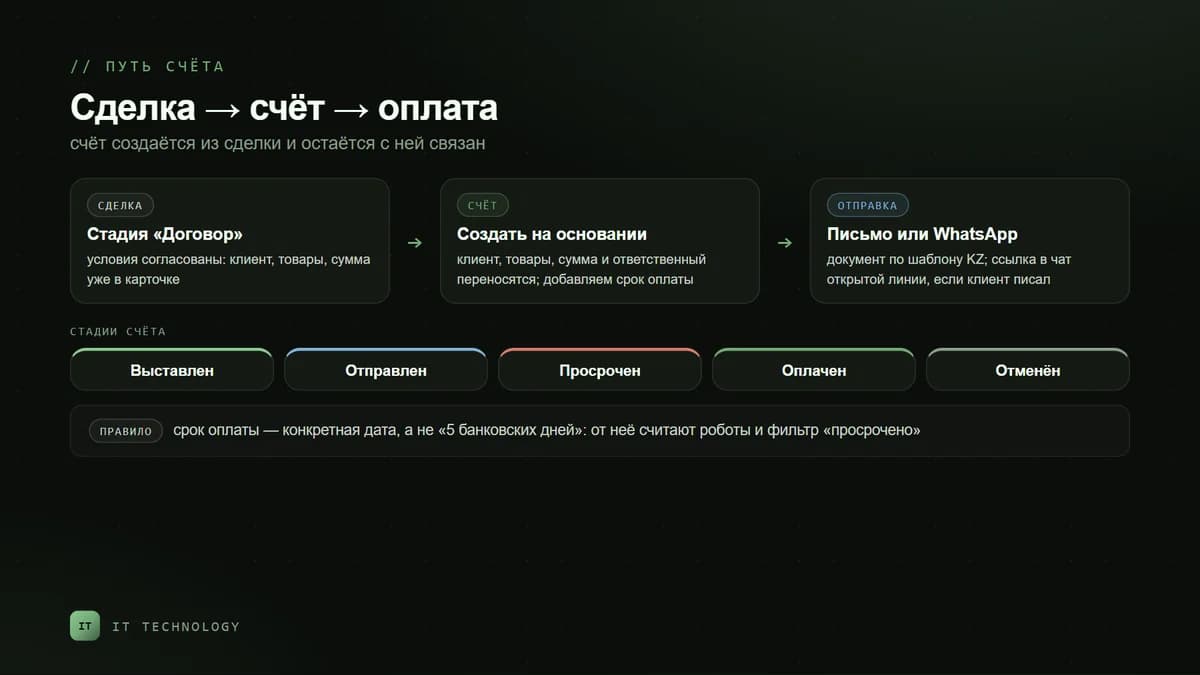
An invoice in Bitrix24 can be created in several ways, and in every case it stays linked to the client: you can see which deal it was issued for, who is responsible and what happened next.
| Where to create it | When it fits | What is carried over |
|---|---|---|
| From the deal card | Terms agreed, time to invoice — the main route in B2B | Client, products and services, amount, responsible person |
| From a company or contact card | A one-off service without a deal | Client and details; products are added by hand |
| From the Invoices section | Working with the invoice list, for example by an accountant | Nothing — all fields are filled in on the card |
| By an automation rule | An invoice is needed at a specific deal stage for everyone | Everything from the deal, without the salesperson |
| Recurring invoice | Rent, maintenance, subscription — on a schedule | An invoice template; the CRM creates and sends it itself |
The invoice’s printable form comes from a CRM document template — the Kazakhstan set has one, with company details, payment purpose code and products; how to adapt the templates, we covered in the article on the document generator. An invoice can be sent by email from the card, by SMS or as a link to an open line chat — WhatsApp, Telegram — if the client has written to you before.
Invoice stages are your receivables control
Invoices, like deals, have a Kanban with stages that can be renamed and extended for your process. Five stages are enough for payment control — and it matters that the stage changes not only by the salesperson’s hand but also by the due date.
- Issued — the invoice is created, the document generated.
- Sent — it has gone to the client; the payment period counts from here.
- Overdue — the due date has passed, no payment; a rule moves the invoice here.
- Paid — the money has arrived; this stage closes the invoice and the deal.
- Cancelled — the client declined or the invoice was reissued.
The due date is a separate invoice field. Always fill it in: the rules and the “overdue” filter count from it. If the contract says “5 banking days”, enter a specific date — the CRM cannot count banking days for you.
Reminders without the salesperson
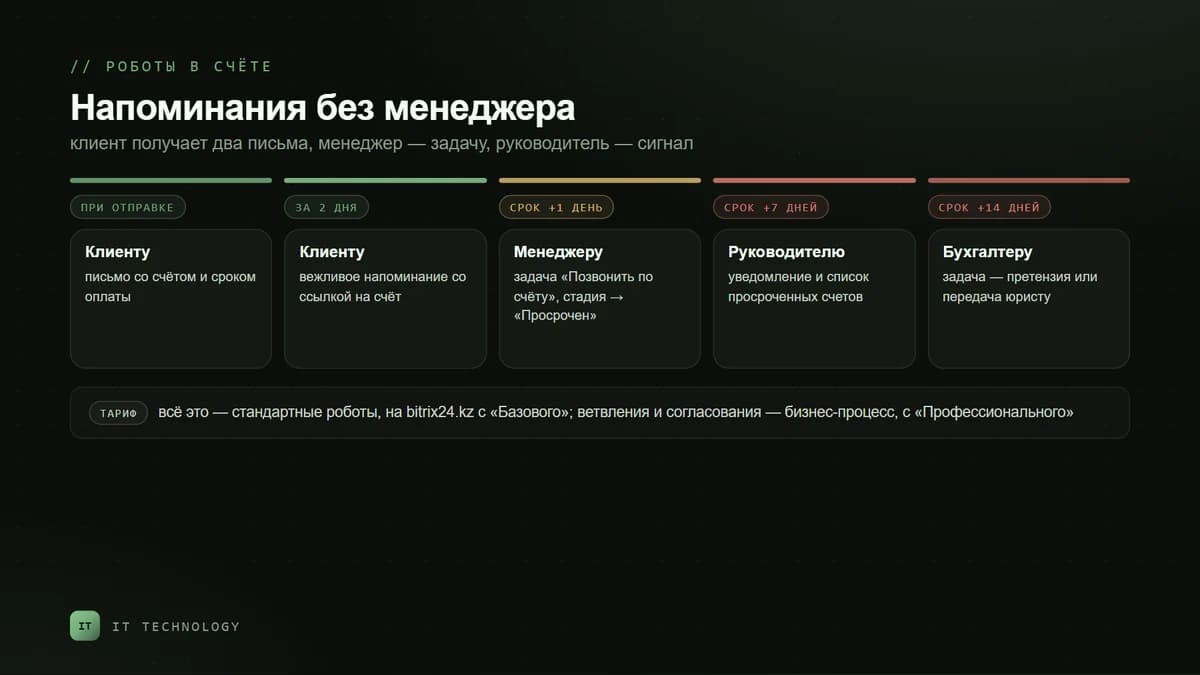
An invoice has an automation tab — the same rules as in deals: send an email or message, set a task, notify, change the stage. A working chain looks like this.
| When | What the rule does | To whom |
|---|---|---|
| Right after moving to “Sent” | Email with the invoice and the due date | The client |
| 2 days before the due date | A polite reminder with a link to the invoice | The client |
| The day after the due date | Task “Call about the invoice” and move to “Overdue” | The salesperson |
| 7 days after the due date | Notification and a list of overdue invoices | The manager |
| 14 days after the due date | Task for the accountant or lawyer — a formal claim | The accountant |
Write the client reminder in a human way: “A reminder that invoice No. … is due on 14 November. If the payment has already been sent, please ignore this email.” For such emails the rule uses a CRM email template into which the invoice number, amount and date are inserted. Ready-made chains for other scenarios are in the article on business processes and automation rules.
How the CRM learns about payment
- Manually. The accountant or salesperson moves the invoice to “Paid” after seeing the receipt in the bank. The most common option in small business — it works if there is a rule about who and when.
- From 1C. If the exchange is set up, the payment fact comes to the CRM from 1C. According to the Bitrix24 help center, the connector is designed for Russian configurations; for Kazakhstan editions this is usually custom work — more in the article on 1C exchange.
- Via a payment link. For retail and small amounts the client pays via a Kaspi link or by card, and the status changes by itself — how to connect this, we wrote in the article on Kaspi and Bitrix24.
Recurring invoices: rent, maintenance, subscription
If a client pays the same amount every month, the invoice does not need to be issued by hand. In the invoice card turn on the Recurring invoice block: the interval — daily, weekly, monthly, yearly or custom; the date of the first invoice; the number of repetitions; the payment period after creation, which goes into the Due date field. Turn on automatic sending — and the CRM will generate the document from the printable form and send an email from the template. All such templates are collected in the recurring invoices list, where you can see who is responsible and when the next invoice is due. On bitrix24.kz recurring invoices come with Standard.
A receivables report for the manager
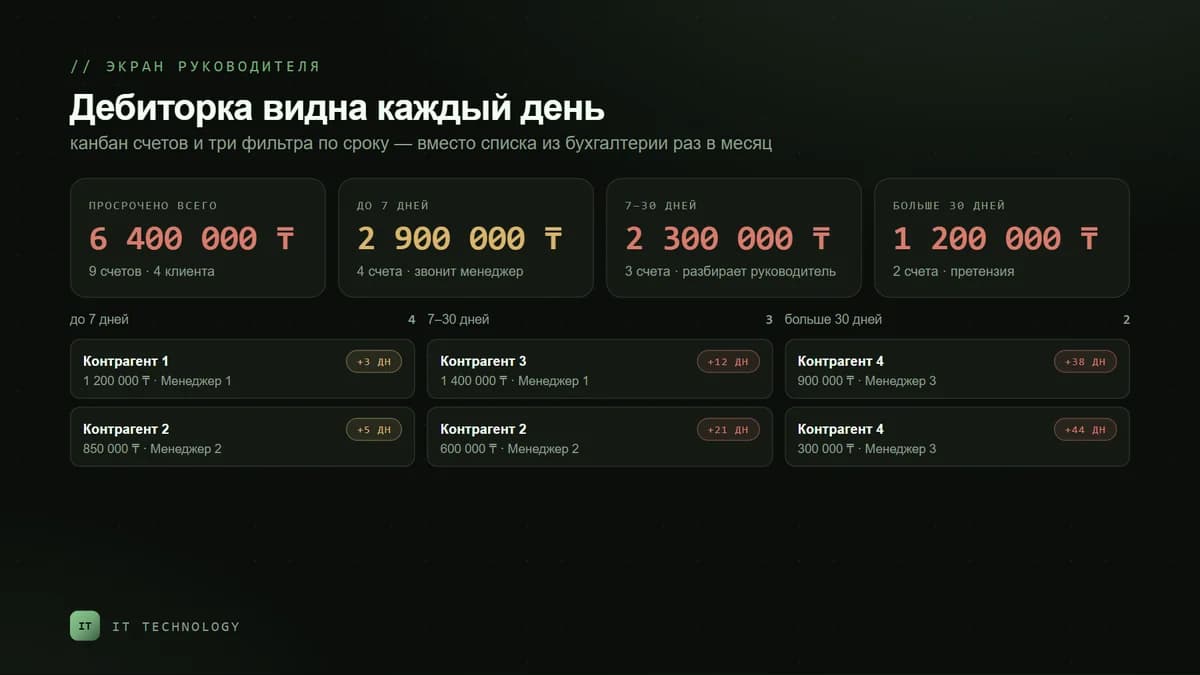
For daily control the invoice Kanban is enough: the amount at the “Overdue” stage is your receivables. For a weekly review, create saved filters by due date: overdue up to 7 days, 7 to 30, over 30 — and by responsible person. When you need a report by clients, terms and salespeople on one screen, with month-by-month dynamics, build it in the BI Builder; it is available from Standard. There you can also show receivables next to the sales plan: meeting the plan with unpaid invoices is a common trap.
What is available on bitrix24.kz plans
| Feature | Free | Basic | Standard | Professional |
|---|---|---|---|---|
| Invoices in the CRM | — | yes | yes | yes |
| CRM documents: printable invoice form | — | yes | yes | yes |
| Automation rules and triggers | — | yes | yes | yes |
| Recurring invoices | — | — | yes | yes |
| Report builder and BI Builder | — | — | yes | yes |
| Business processes | — | — | — | yes |
Plan prices are on the Bitrix24 licenses page. Basic is enough for controlling payments on deals. Standard is needed if there are subscription payments or the manager wants a receivables report by clients and salespeople.
Common mistakes
- Issuing invoices in 1C without creating them in the CRM — the salesperson cannot see payments, and the rules have nothing to count the term from.
- Not filling in the due date — the “Overdue” stage never comes.
- Moving the deal to “Won” when the invoice is issued — the sales plan is met, receivables grow.
- Reminding only the client — without a task for the salesperson and a signal to the manager, an email is easy to ignore.
- Not assigning who marks payment — invoices sit in “Sent” for months, and the receivables report lies the other way.