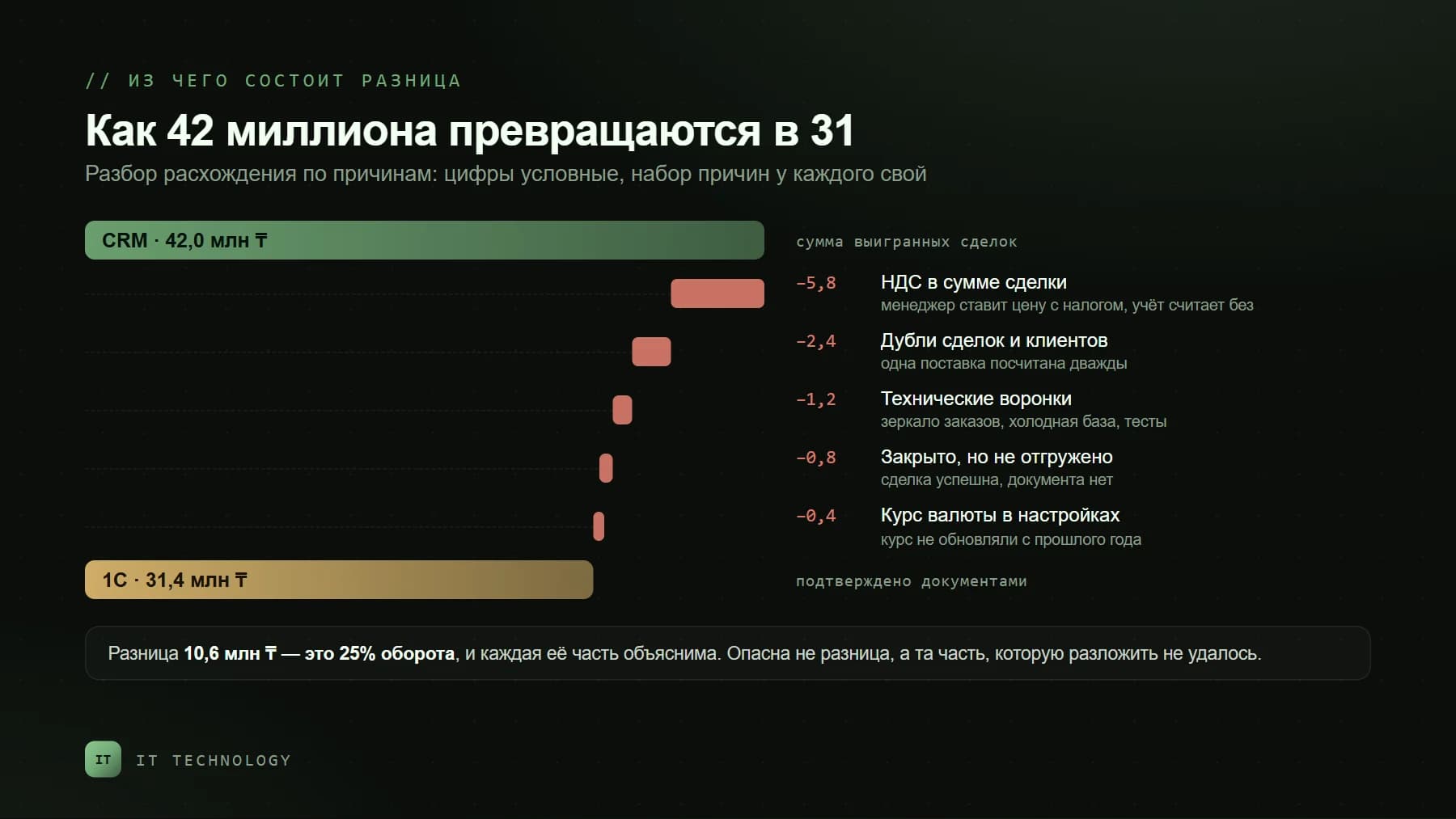
The same conversation happens every quarter. The owner opens the CRM dashboard: 42 million sold. The accountant pulls the sales ledger: 31 million. From there it goes one of two ways — a week spent looking for who got it wrong, or everyone quietly stops opening the CRM. The second happens more often.
The uncomfortable truth is that both numbers are correct. Bitrix24 measures sales the way the sales team sees them; the accounting system measures what the documents confirm. They are not supposed to match to the last tenge. The goal is not to force them into agreement, but to make every million of the gap explainable and owned by someone.
First agree on what exactly you are comparing
Half of all discrepancies disappear before the real work starts — at the moment you realise the two reports were never measuring the same thing. Every company carries at least five different "turnovers", and each one is correct in its own context.
| Metric | Where it lives | What it actually means |
|---|---|---|
| Open pipeline value | CRM, active stages | Intent to buy. Part of it will never become a sale |
| Won deals | CRM, the "Deal won" stage | Sales as the sales team sees them — dated when the manager closed the deal |
| Shipments / revenue | 1C, shipping documents | Sales as accounting sees them — dated by the document |
| Cash received | Bank, 1C | Money in the account. Differs from revenue by prepayments and debts |
| Taxable turnover | The VAT return | The VAT base, calculated by its own rules — see our guide to the 2026 reform |
Only like-for-like comparisons make sense: won deals against shipments, cash against the bank. And always on one date — either both reports use the shipping date, or both use the payment date. Below are the eight reasons why even a correctly chosen pair still diverges.
Eight reasons for the gap
1. The reporting period captures more than you think
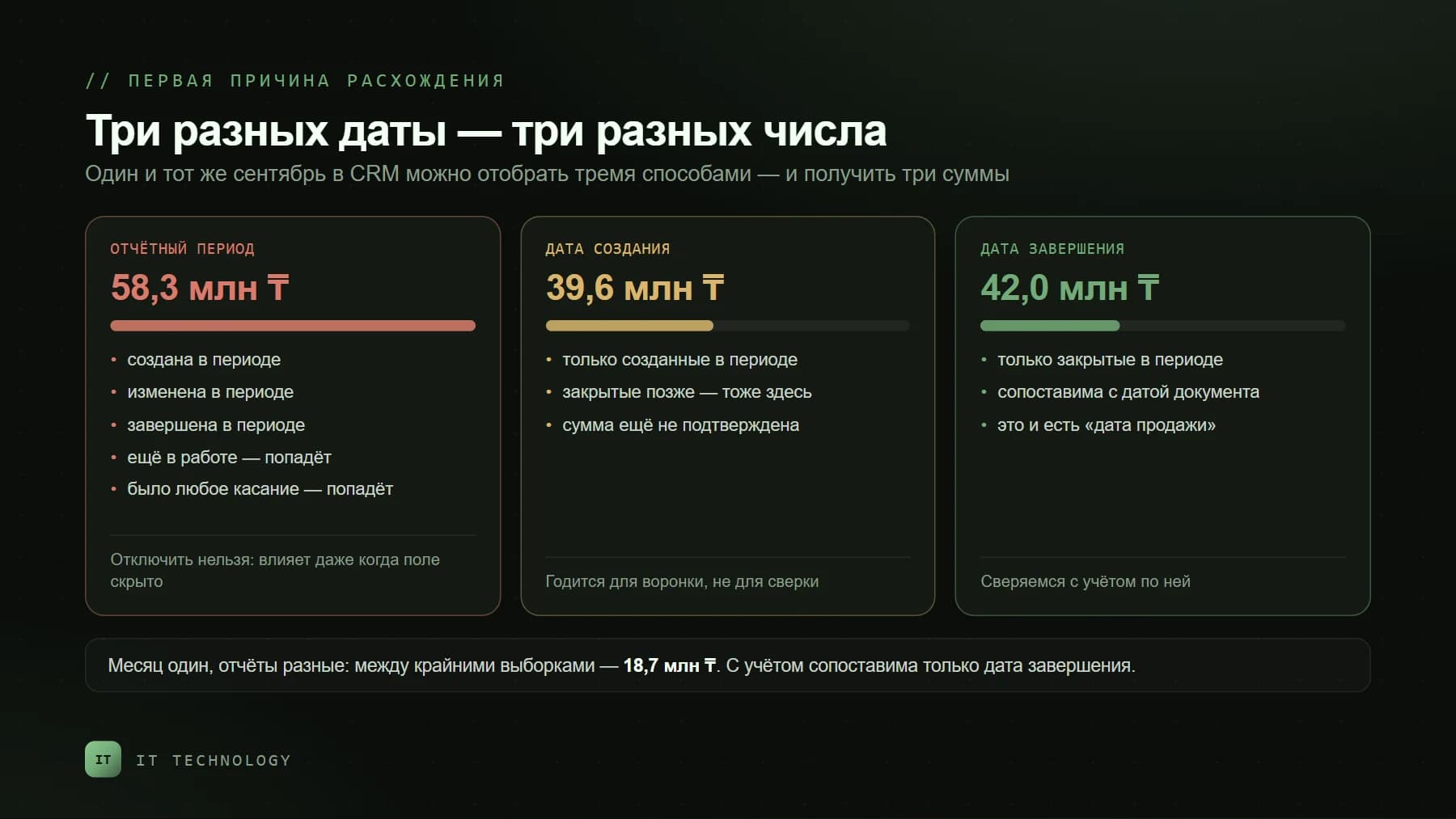
The most common reason, and the least obvious one. Bitrix24 CRM analytics has a "reporting period" parameter, and it does not select what intuition suggests. A deal falls into the period if it was created, modified or completed within it — and also if it is simply still open, or if there was any activity on it, an email or a call. So a deal created in March lands in your September report because someone called the client yesterday. The help desk says it plainly:
The reporting period always affects the data in a report, even when the field is hidden. It cannot be excluded from filtering entirely.
How to check. Take one month and total it three ways: by reporting period, by creation date and by closing date. Three numbers, and they will not match. What to do. Agree on which date counts as the sale date — for reconciliation with accounting that is the deal's closing date — and always filter on it, while keeping the reporting period as wide as possible.
2. A human decides when a deal is "won"
In the CRM a sale appears when a manager drags the card into the final stage. In accounting it appears when a document is issued. Between those two events there can be anything from zero days to infinity: deals get closed "as agreed" before shipment, closed at month end to hit a target, or left open long after the goods went out. None of this is malice — the stage reflects the manager's confidence, not the fact of delivery.
How to check: export the month's won deals and see how many have the accounting document number filled in. If there is no such field, that is your first piece of work. What to do: let a robot set the won stage from accounting data instead of doing it by hand. How the exchange works and what it really carries over is covered in our guide to Bitrix24 and 1C integration.
3. The deal amount was typed in, not built from products
The deal amount has two modes. In automatic mode it is calculated from the products in the card, taking quantity, prices and discounts into account. In manual mode you enter the amount yourself and the products no longer affect it — handy early on, when the budget is only an estimate. The trouble is that people forget to switch it back: the card holds 1.2 million worth of products, the Amount field says 1.5 million, and 1.5 is what reaches the report.
How to check: compare the deal amount with the sum of its product lines — the gap is immediately visible. What to do: once an invoice is issued, the amount should be calculated automatically. Every mode switch is recorded in the deal timeline, so a spot check takes minutes.
4. VAT: which figure includes tax and which does not
A classic. The manager enters the price "as on the invoice", i.e. including VAT, while accounting books revenue net of tax. On 40 million of turnover this reason alone produces a gap of roughly 5.5 million at the 16% rate. Add deals started before 2026 at the old 12% rate and the discrepancy stops being a mystery.
What to do: fix the rule — the deal Amount field is always gross or always net, there is no third option — and configure product cards and invoice templates the same way. We covered the new rate, the registration threshold and the CRM settings separately in VAT at 16% and the 43.25 million tenge threshold.
5. Deal currency and an exchange rate nobody updated
If some deals are in dollars or euros, the portal converts them into the base currency using the rate stored in CRM settings. And here is what matters about that rate:
Exchange rates are not updated automatically; they can only be changed manually.
Which means foreign-currency deals are counted at a rate somebody typed in when the portal was set up — possibly two years ago. Accounting, meanwhile, uses the National Bank rate on the document date. What to do: either keep the rate current (a monthly task for the accountant, or a robot that pulls it), or compare foreign-currency deals separately in their own currency, which is more honest anyway.
6. Duplicates: one sale counted twice
Two deals for one delivery, because the client wrote on WhatsApp and called at the same time. Or one client held as three company cards with different business IDs. Both inflate CRM turnover while accounting, where there is a single delivery, stays unchanged. How to find and merge such records without losing history is covered in our post on duplicate companies and clients with several legal entities.
7. Technical deals made it into the report
Almost every mature portal carries pipelines that do not exist in the business: a mirror of orders from 1C, a cold-calling list, a test pipeline left over from the rollout, deals created automatically by a website form. Their amounts are not sales. How to check: total the figure across all pipelines and then across the one selling pipeline; a large gap means your dashboard is built on "everything". What to do: state explicitly in management reports which pipelines they include.
8. Returns, cancellations and partial shipments
A deal is closed at 3 million, 2.1 million ships, and the client refuses the rest. Accounting sees it; in the CRM the deal stays won at the full amount, and nobody will change it because the bonus has already been calculated. What to do: review won deals with partial shipments once a month, and if returns are frequent, add a "shipped amount" field filled by the integration and measure target achievement against that.
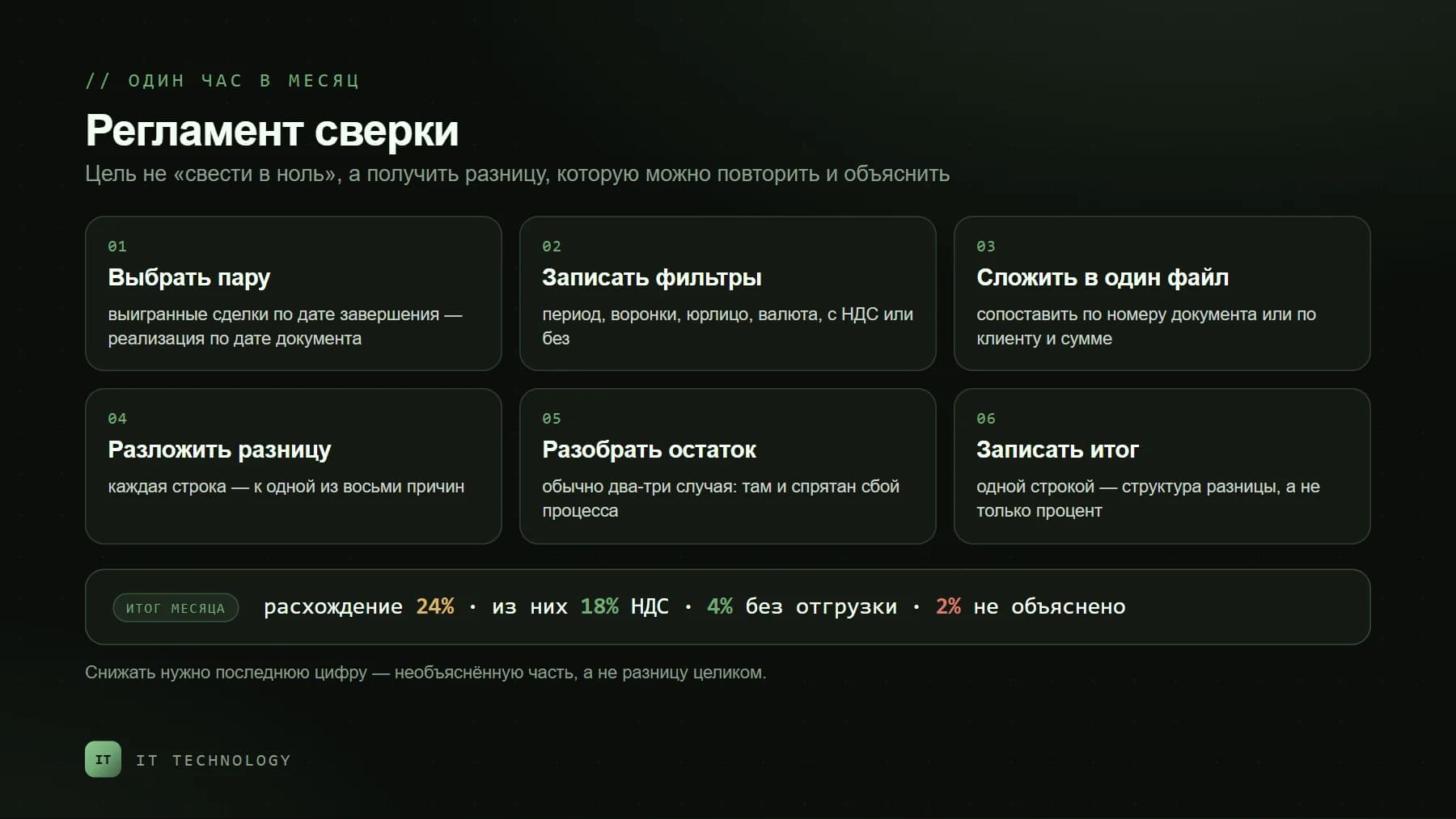
A reconciliation routine: one hour a month
- Pick one pair of reports. Won deals by closing date in the CRM against shipments by document date in accounting. One pair, not three.
- Write the filters down. Period, pipelines, legal entity, currency, gross or net of VAT. In a month you will not remember how you counted.
- Put both reports in one file and match the rows by document number, or by client and amount where there is none.
- Break the difference down into the eight causes above. Every line needs a cause, not a shrug.
- Work through the remainder one by one. It is usually two or three cases — and that is where the expensive process failure hides.
- Write the result as a single line: "gap 24%, of which 18% VAT, 4% closed without shipment, 2% unexplained". Next month you compare the structure of the gap, not just the numbers.
What to configure so the gap stops growing
- A "shipping document number" field on the deal — filled by the integration, or by the manager on closing if there is none. Without it, reconciliation stays manual forever.
- Automatic amount calculation once an invoice is issued; manual mode only at early stages.
- Required fields at the won stage: amount, legal entity, shipping date. Bitrix24 can block the move until they are filled.
- A robot sets the won stage from accounting data, not the manager's mood.
- Exchange rates updated on a schedule — monthly or by a robot, not "when someone remembers".
- Management dashboards built on named pipelines and on the closing date, not on "the whole portal".
- Duplicate hunting as a routine, not a panic the night before reconciliation.
What size of gap is acceptable
There is no universal "no more than 5%". In project businesses with long cycles the difference between CRM and accounting easily reaches a third of turnover and is perfectly explainable; in retail that ships the day it sells, even 10% is a warning. A healthy gap is one you can break down into causes and reproduce next month. What you should be reducing is not the gap itself but its unexplained part: first to five percent, then to zero.
FAQ
Which Bitrix24 report should I use for reconciliation?
Can CRM and 1C ever match exactly?
Why doesn't the deal amount match the products in the card?
How do we count turnover with several legal entities?
Does Bitrix24 account for VAT when calculating profit?
How long does it take to set reconciliation up?
If reconciliation ends in an argument every quarter, start small: write down which two numbers you compare and on which date. After that the difference breaks into causes almost mechanically. Need a hand? Get in touch — we will take the gap apart on your own data and show you what is configuration and what is process.