In January it looked like someone else's problem: the rate went up, the threshold came down, the accountant will sort it out. By autumn it turned out the people sorting it out are the sales reps. Invoices go out at the old rate, clients send them back for correction, and at one company turnover crossed the threshold in July — they found out in September while collecting documents for the quarter.
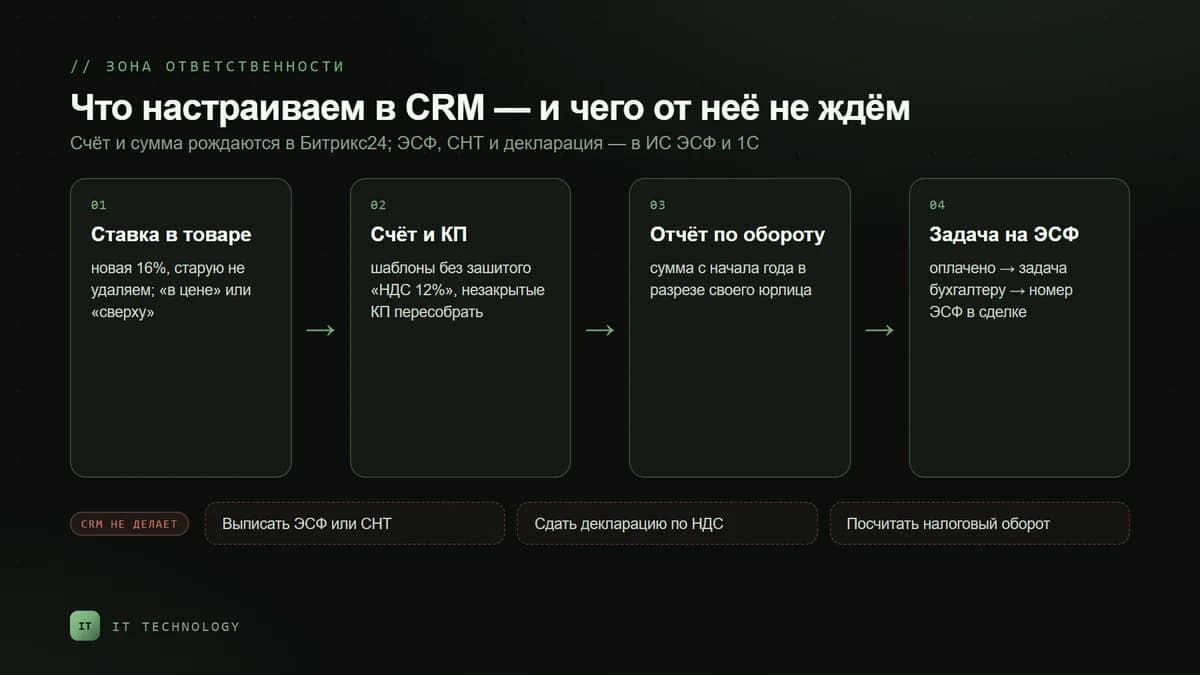
A CRM does not calculate taxes and does not file returns. But the invoice, the amount and the date are born inside it — everything that later becomes an argument with accounting. Below: what exactly to change in Bitrix24 after the 2026 tax reform, how to set up an early warning that you are approaching the VAT threshold, and what not to expect from a CRM. This is not tax advice: check the figures and deadlines with your accountant and the current version of the code.
What changed in tax law and why it concerns the CRM
The new Tax Code changed three things every sales rep sees: the rate on the invoice, the moment a company becomes a VAT payer, and how fast it has to react.
| What | Before | From 2026 | What it means for the CRM |
|---|---|---|---|
| VAT rate | 12% | 16% | A new rate in product records, invoices, proposals and document templates |
| Registration threshold | 20,000 MCI | 10,000 MCI — 43,250,000 ₸ | The threshold is within reach for a mid-sized business; turnover needs watching |
| Filing deadline | 10 business days after the month of excess | 5 business days from the excess | You need to know the moment it happens, not at quarter close |
| Simplified regime | a limit plus a headcount cap | limit 600,000 MCI, no headcount cap, 185 prohibited activity codes | Some companies move to the general regime — and keep full accounting for the first time |
A note on the simplified regime: it exempts you from VAT registration regardless of turnover, but the list of activities barred from it has grown to 185 codes — legal, accounting and consulting services, commercial property rental and others. Companies that moved to the general regime because of this are now calculating VAT for the first time, and it is usually they who ask what exactly should change in the CRM.
The rate in the product record and on the invoice
Taxes in Bitrix24 are configured under CRM → More → Settings → CRM settings → Taxes. It is a single list of rates used both in products and in invoices. It can be changed by a portal administrator or an employee with the matching rights.
- Add the 16% rate and make it the default for new products.
- Do not delete the old rate. Documents issued before the reform need it: deleting the rate breaks the calculation in historical invoices and deals. Simply stop assigning it to new items.
- Walk through the product and service catalogue. The record holds the rate and whether the tax is included in the price or added on top — two different scenarios, and the invoice total depends on the choice.
- Check invoice, act and proposal templates. If the rate or a line like “including VAT 12%” is hard-coded into the template, reps will send it out even when the products are correct.
- Rebuild open proposals. Quotes sent before the increase will not match the actual invoice at signing.
- Tell the reps what changed. The most common mistake is a total typed in by hand “like last time” instead of a recalculation.
Early warning: how not to sleep through the threshold
The real new pain is not the rate but the threshold. It used to be fine to learn about an excess after the month closed. Now you have five business days from the moment it happens, which means somebody has to see turnover during the month, not after it.
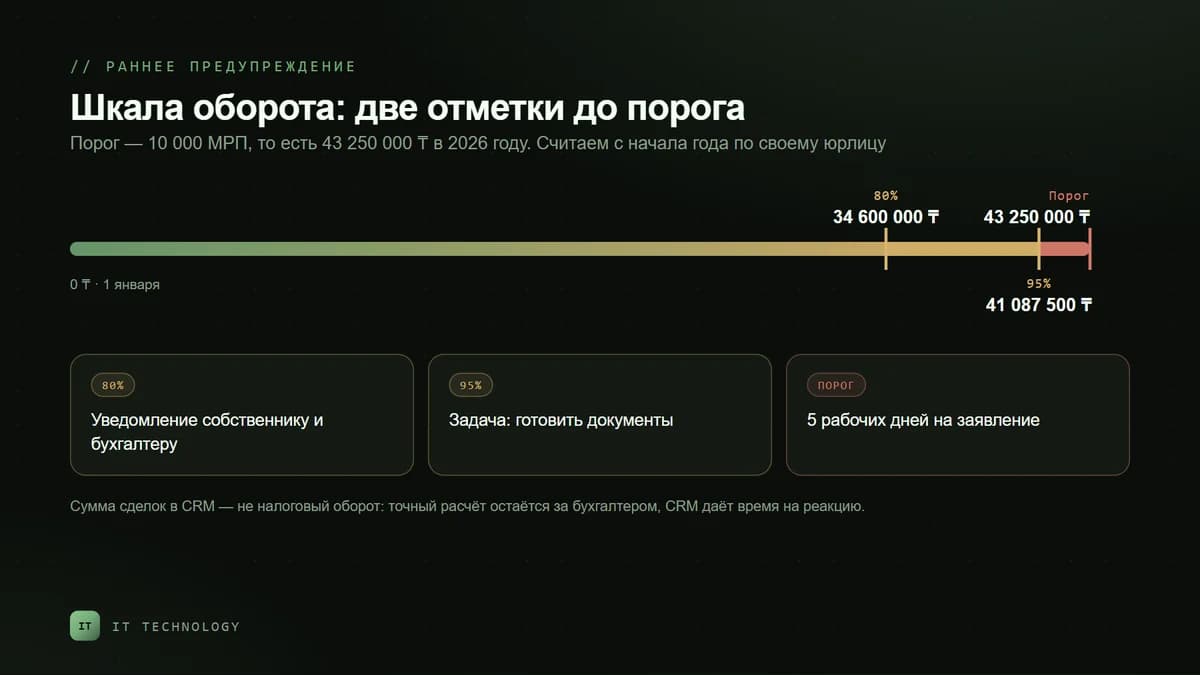
An important caveat first: the sum of won deals in the CRM is not taxable turnover. The moment of supply, advances, refunds, exempt transactions and exchange differences follow their own rules, and the final figure is born in the accounting system. The CRM gives you something else — an early warning so the accountant runs the exact calculation in time.
| Mark | Amount in 2026 | What the system does | Who reacts |
|---|---|---|---|
| 80% of the threshold | 34,600,000 ₸ | Notification to the owner and the accountant | The accountant reconciles the CRM figure with accounting |
| 95% of the threshold | 41,087,500 ₸ | Task “prepare registration documents” | The accountant prepares the application and the digital signature |
| Threshold exceeded | 43,250,000 ₸ | Urgent task with a 5-business-day deadline | Owner and accountant file the application |
- A “turnover since 1 January” report — the sum of deals in the won stage by close date, filtered by your own legal entity. One click to open, but the point is that it exists at all.
- A robot or workflow on reaching the marks: a chat message to the owner and a task for the accountant. Keep the threshold in a single field so you change it once a year, not in ten places.
- An owner. A notification sent to everyone reaches no one. The threshold needs one responsible person — usually the accountant or the finance director.
- A monthly reconciliation. Five minutes: the CRM figure against the 1C figure. A gap is not a bug in the robot — it is a reason to understand what the CRM counts differently.
Several legal entities: where the CRM helps
The threshold is counted per taxpayer, and both Kazakhstani clients and the business itself often run several legal entities. Bitrix24 has “My companies” for this: you can hold several of your own requisite sets, and the invoice states which entity issues it. Turnover therefore has to be tracked per entity too — otherwise the report shows a combined figure that belongs to none of them.
- Add every entity of yours to “My companies” with full requisites — the same values land on the invoice and the printed form.
- Add a breakdown by your own company to the turnover report, not just by pipeline.
- On the client's side it is the same story: one client, one record, several requisite sets. How that works is covered in the article on duplicate companies.
E-invoices and delivery notes: what Bitrix24 does not do
This is the most common confusion. A payment invoice from the CRM and an electronic invoice are different documents. The e-invoice is issued in the state system (or in 1C with an upload to it), signed with a digital signature and has its own deadlines: no earlier than the date of supply and no later than 15 calendar days after it; for certain activities, until the 20th of the following month. Bitrix24 issues neither e-invoices nor delivery notes and sends nothing to state systems.
What the CRM really can do is stop you from forgetting. A working setup: the deal moves to “paid” → a robot creates a task for the accountant to issue the e-invoice with a deadline → the number and date of the issued e-invoice go back into the deal. Six months later the question “did we issue an e-invoice for this shipment?” is answered by the record, not by memory.
| Document | Where it is created | What the CRM stores |
|---|---|---|
| Payment invoice | Bitrix24 | The invoice itself, amount, rate, payment status |
| Electronic invoice | State e-invoice system or 1C | Number, date and the fact of issue — as a field in the deal |
| Delivery note | State e-invoice system | A mark that the accompanying note has been issued |
| VAT return | Taxpayer cabinet or 1C | Nothing — that is the accountant's work |
A one-day checklist
- Add the 16% rate and make it the default for new products.
- Keep the old rate but take it out of active use.
- Go through the catalogue: rate, “included” or “on top” — deliberately and consistently.
- Check invoice, act and proposal templates for hard-coded VAT.
- Rebuild proposals that were sent but not signed.
- Add a threshold field and a turnover-since-January report broken down by your own entity.
- Set a robot on the 80% and 95% marks and name the responsible person.
- Add an “issue the e-invoice” task at the payment stage and a field for its number.