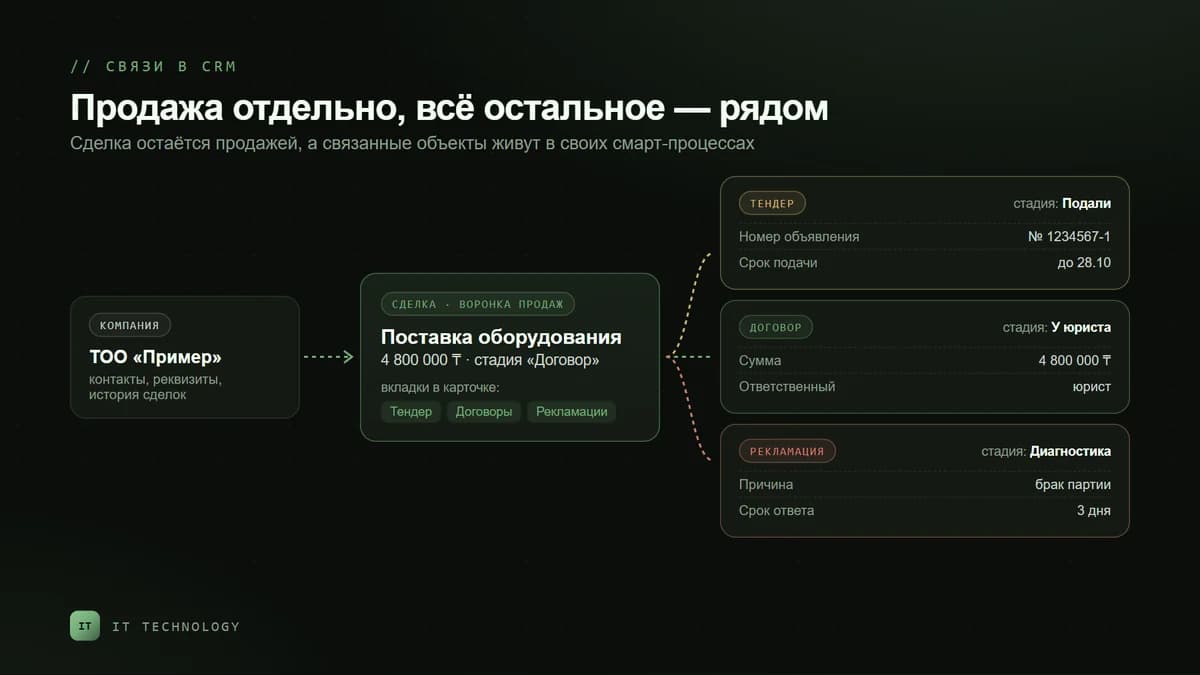
The deal pipeline in Bitrix24 is designed for sales: there is a client, an amount and a chance that they will buy. But after six months of use it usually collects everything. The team that bids in public procurement adds stages like “Reviewing tender documents” and “Bid submitted”. The lawyer asks for a “Contract under approval” column, the service team for “Complaint”. In the end conversion is calculated on deals that were never sales, a manager scrolls through a twenty-column kanban, and the lawyer has access to the whole client base.
For objects like these Bitrix24 has smart processes — your own CRM entities with their own fields, stages, robots and permissions. Below: what a smart process is, when you really need one and when another pipeline is enough, five scenarios for companies in Kazakhstan, and how to link it all to deals so that nothing is tracked twice.
What a smart process is, in plain words
Deals, contacts and companies are the standard CRM objects. A smart process lets you add your own: with its own name, set of fields, kanban and automation. Bitrix24 help gives examples of a vet clinic that needs a database of animals and a real estate agency with a database of apartments. In B2B these are usually contracts, tenders, complaints, purchase requests and client equipment under service.
When you create a smart process, you switch on only what it needs:
- Its own pipelines and stages with a kanban — and tunnels to move items between pipelines.
- Robots and triggers — they work only if stages are on; for complex scenarios there is the business process designer.
- Client, source, observers, start and end dates — system fields you can add to the card.
- Document printing from a template right in the card, and catalog products.
- Links to deals, contacts, companies and other smart processes — with a tab of related items in their cards.
- Recurrence — items are created automatically on a schedule: every day, week, month, year or at your own interval.
Each smart process has its own access rights, set in the general CRM permissions. A smart process can be created only in the web version, while its items can also be worked on in the mobile app.
A smart process or another deal pipeline
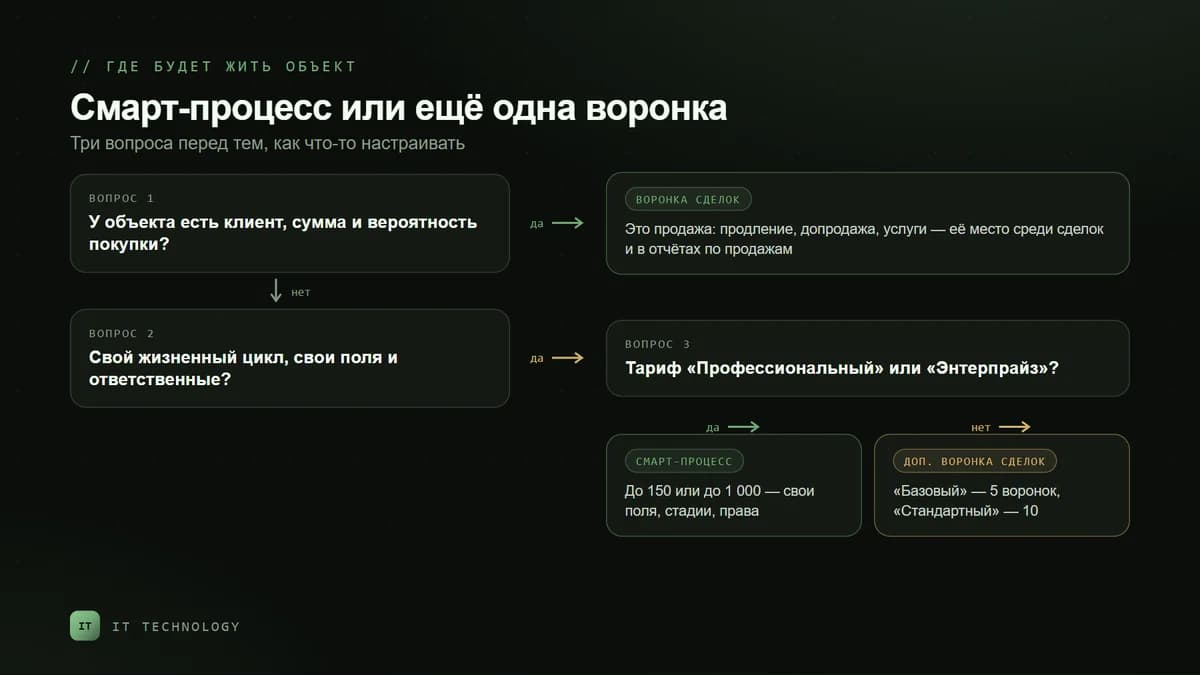
The main design question is not “how to set it up” but “what kind of object is this”. The rule we use: if the object has a client, an amount and a probability of purchase, it is a sale and belongs in the deal pipeline. If the object has its own life cycle, its own fields and its own owners, it is a smart process.
| Question | Another deal pipeline | Smart process |
|---|---|---|
| Is it a sale with an amount and a probability? | Yes — for example a renewal or a sale of services | No — a contract, tender, complaint or serviced object |
| Are the fields different from a deal? | Almost the same | Its own: lot number, bid deadline, complaint reason |
| How many such objects per sale? | One to one | Several: two contracts or three complaints for one deal |
| Who works with them? | Sales managers | A lawyer, a tender specialist, the service team — each with their own rights |
| Do you need separate statistics? | No, sales reports are enough | Yes — its own deadlines and results, not mixed with sales |
| bitrix24.kz plan | Basic — 5 pipelines, Standard — 10, Professional — 20 | Professional and Enterprise only |
If you are on Standard, a separate deal pipeline is a workable compromise: it has its own stages and robots, and a tunnel links it to the main pipeline. The downside is that these are still deals: they land in the general sales reports and have to be filtered out. We explained how the CRM modes work in the article on leads and deals.
Five scenarios for companies in Kazakhstan
Tenders and public procurement
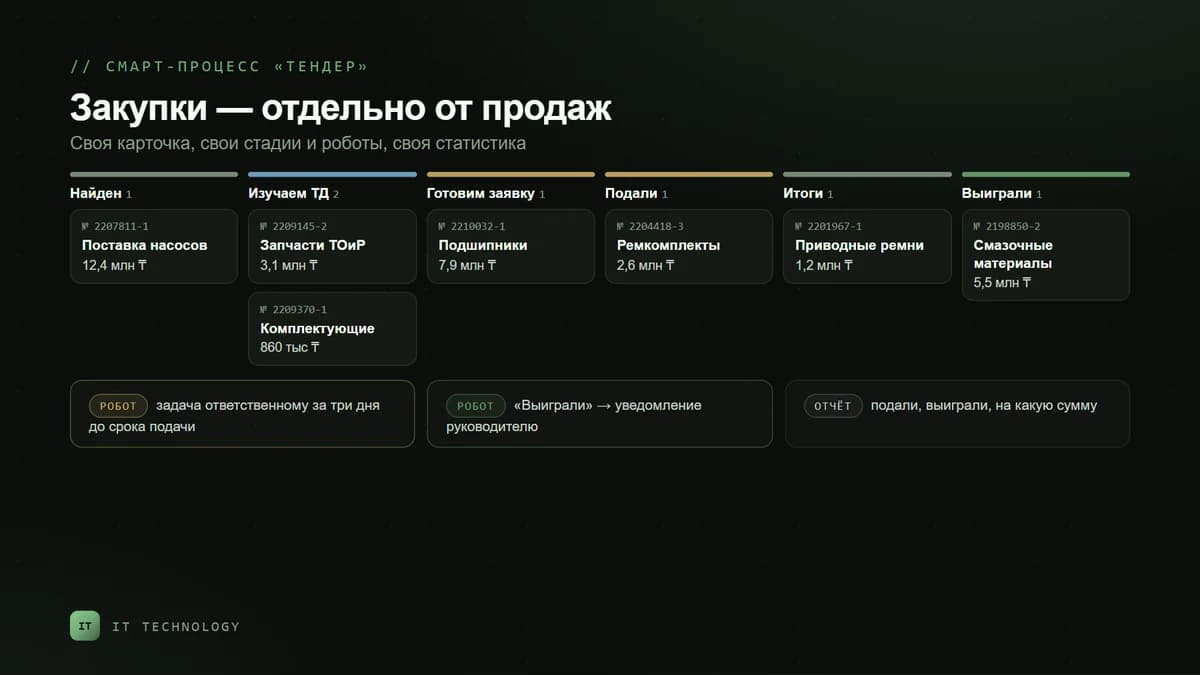
Companies that bid on goszakup.gov.kz or in Samruk-Kazyna procurement most often track bids in Excel or as stages right inside deals. In a “Tender” smart process each procurement gets its own card: the notice number, the customer from the company base, the lot amount, the bid deadline, a link to the documents, and whether a bid security is required.
- Stages: found → reviewing documents → preparing the bid → submitted → results → won or lost.
- Robots: a task for the owner three days before the bid deadline, a notification to the manager when the item moves to “Won”.
- Report: how many bids were submitted, how many were won and for what amount — separately from sales.
Contracts and approval
A contract is a separate object: one deal can have several, and they have their own stages and their own owner — the lawyer. When the deal reaches the “Contract” stage, the “Create smart process item” robot creates a contract in the right pipeline and stage, carries over the amount and keeps a link to the deal. The document is printed from a template right in the contract card. When the deal is won, the “Change smart process item” robot moves the contract to “Signed” — this scenario is also described in Bitrix24 help.
Complaints and returns
It is convenient to link a complaint to the company and to the deal under which the goods were shipped. Stages: received → diagnostics → decision → replacement or refund → closed. Robots set a task for the service team, notify the client’s manager and remind about the response deadline. The complaints report shows which products and suppliers cause the most problems — without spoiling the sales conversion.
Scheduled maintenance
If you service clients’ equipment, a “Maintenance” item can be made recurring: Bitrix24 creates it on a schedule — say, once a quarter — with an owner and a deadline. The first item is created by hand and becomes the template. Quarterly scheduled maintenance is one of the examples in the vendor’s help.
Internal requests: purchasing, payments, business trips
Not everything is about clients. Purchase requests to suppliers, invoice payment requests or business trips can be moved to a digital workplace — a separate section under Automation that groups one department’s smart processes. Professional allows up to 20 such workplaces, Enterprise up to 150.
How to link a smart process to a deal
A smart process loses its point if the tender, the contract and the deal are tracked separately and data is copied by hand. The link is set up in three layers:
- Links in the settings. When creating the smart process, enable linking to deals and companies and the “Add a list of related items to the card” option — the deal will get a tab with its contracts and complaints.
- Robots in the deal. “Create smart process item” — with a choice of pipeline and stage, carrying over the amount and linking to the current deal. “Change smart process item” — change the stage or the owner; a filter by ID is required. “Get smart process item information” — insert contract fields into an email to the client.
- Business processes — when you need more complex logic: chained approvals, conditions on the amount, different routes for different contract types. Examples are in the article on 12 business process scenarios.
For integrations, smart process items are available via REST — through the crm.item.* methods with the smart process type ID. This is how they are linked to 1C or an external service; we explained how the exchange with the accounting system works in the article on 1C integration.
Where to start: five steps
- Find objects that are in the wrong place: deal stages that have nothing to do with the sale, Excel sheets next to the CRM, contracts in email threads.
- Describe the card and stages for each — which fields are needed, who is responsible at each stage, what counts as the result.
- Create the smart process and switch on only the options you need: stages, robots, client, document printing, links to deals. An extra switch means an extra field in the card.
- Set up permissions. Contracts for the lawyer, complaints for the service team, without access to the whole sales base. More in the article on protecting the client base.
- Link it to deals with robots and test on three to five real cases before moving everything else.
The mistakes we see most often
- A smart process for something that is actually a sale. Renewals and upsells are deals, otherwise their amounts drop out of the sales reports.
- A copy of every deal field. The beauty of a smart process is that its card contains only what is needed.
- No link to the deal. Then the manager and the lawyer track the same thing twice, and the data drifts apart.
- Permissions left “as they happened”. Roles need explicit access to each smart process, otherwise the lawyer will not see the contracts or will see too much.
- The plan was not considered. Smart processes exist only on Professional and Enterprise. If you plan to downgrade, first decide where this data will live.
Frequently asked questions
Are smart processes available on the Standard plan?
How many smart processes can be created?
How is a smart process different from a business process?
Can a contract or an act be printed from a smart process?
Can a smart process item be created automatically from a deal?
Can smart processes be used via the API?
If tenders, contracts or complaints already live in your deal pipeline, get in touch. We will work out which objects should move to smart processes and which should stay in pipelines, and set up the links to deals. What else the setup includes is on the automation page.