The end of the year is renewal season. Some companies have an annual cloud plan running out, others a box license bought last autumn. And almost every company has its own story about it: the renewal email went to a former administrator’s inbox, the invoice sat with accounting for a week, and on Monday the sales team found that robots were not creating tasks, telephony was silent and leads had gone somewhere.
The data is usually still there in such cases, but normal work is impossible — and there are deadlines after which things get serious. Below: what exactly happens to the Bitrix24 cloud and box after payment runs out, how many days you get to fix it, where you can overpay more than threefold, and what to do a month before the date.
Cloud: what happens on the day the plan ends
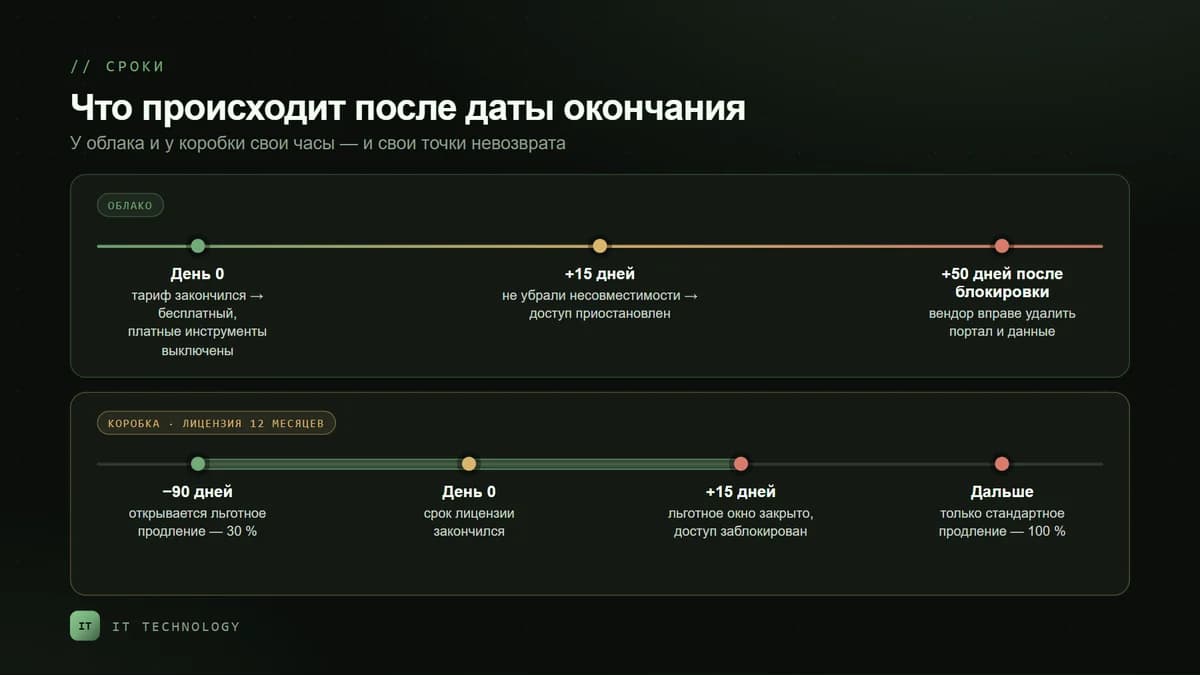
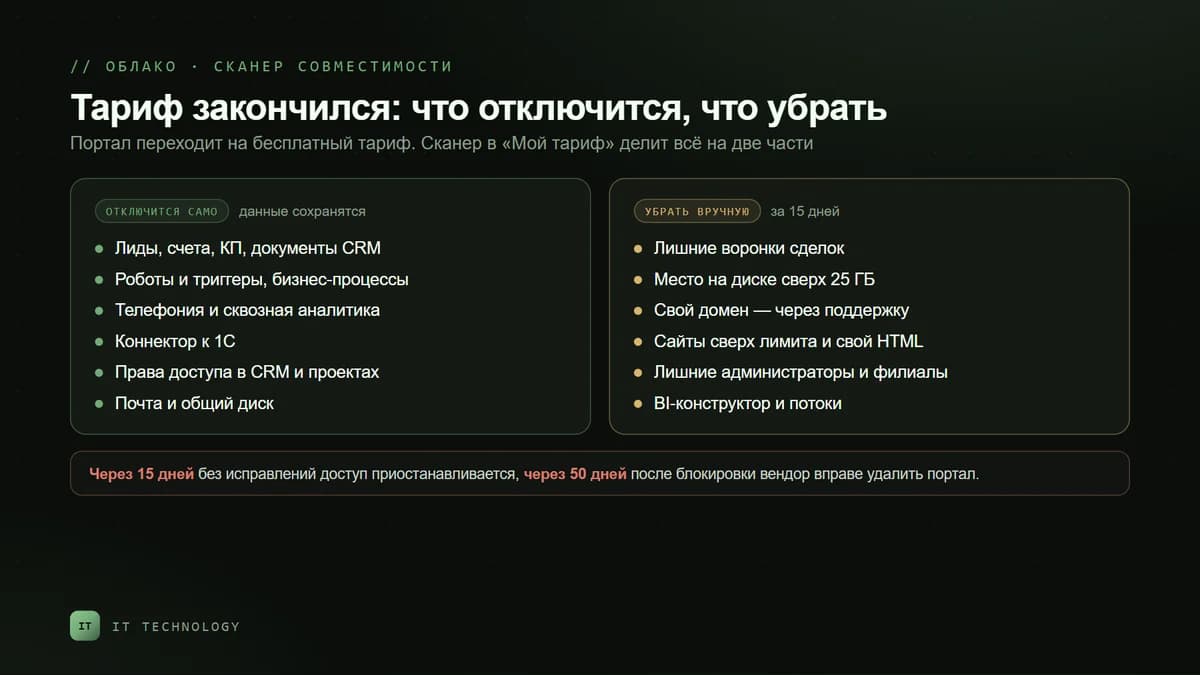
If the plan is not renewed, Bitrix24 automatically switches to the free plan. The portal does not disappear or get blocked that day, but the paid plan’s tools become unavailable. Some of them are disabled automatically, some have to be removed by hand — the plan compatibility scanner in the My plan widget shows which.
Disabled automatically — data is kept
- Leads, invoices, quotes and CRM documents.
- Robots and triggers in the CRM and tasks, business processes and lists — all the automation that was set up during implementation.
- Telephony and end-to-end analytics.
- The 1C connector — the exchange with the accounting system stops.
- Access rights in the CRM and projects, stage-dependent properties and field visibility.
- Mail — when moving to the free plan — and the company’s shared drive.
All of this becomes available again if you move to a suitable plan: the data is kept when tools are disabled. But until the plan is renewed, the sales team works without automation — and that is exactly what deal tasks and new-lead notifications rely on.
Remove by hand — you have 15 days
- Extra deal pipelines — if there are more than the plan allows.
- Disk space over the limit — on the bitrix24.kz free plan that is 25 GB.
- A custom domain — it is disconnected through Bitrix24 support, and the portal goes back to its standard address.
- Sites over the limit and blocks with your own HTML code.
- Extra administrators, branches, BI Builder and flows — if the new plan does not include them.
If the incompatibilities are not fixed within 15 days after the plan ends, access to Bitrix24 is suspended. The portal is not deleted right away, but 50 days after the block the vendor reserves the right to delete it together with the data — and it cannot be restored. A separate rule applies to the free plan: a portal nobody has logged into for 50 days is deleted automatically.
If the incompatibilities are not fixed within 15 days after the plan ends, access to Bitrix24 will be suspended.
Auto-renewal: convenient if you know three rules
- Card only. Auto-renewal is enabled when you pay by card, and with monthly payment it is on by default. A company paying by invoice will not be renewed automatically.
- Three charge attempts: a day before the plan ends, on the day it ends and two days after. After the third failure auto-renewal turns off, an email goes to the address in the order, and you have to pay manually under My plan → Order history.
- The card has to be valid. Expired, the owner’s details changed, the limit was too low — and the charge will not go through. You can change the card no earlier than 35 days before the plan ends.
A separate trap: the error email goes to the address specified in the order. If the order was placed by an employee who left long ago, nobody will learn about the problem until the day the robots switch off.
Box: a 12-month license and the price of being late
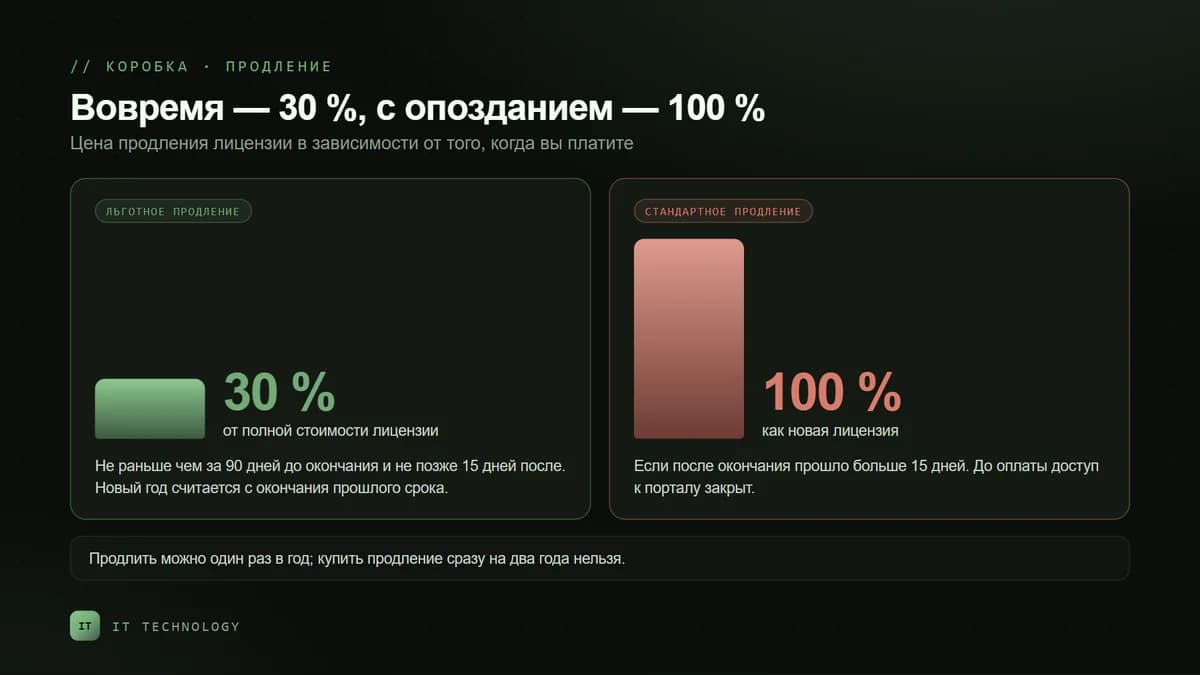
Since March 2022 box licenses have been sold for 12 months, after which they are renewed for another year. Since 1 November 2025 renewal has two modes — and the difference between them is more than threefold.
| Preferential renewal | Standard renewal | |
|---|---|---|
| When | No earlier than 90 days before expiry and no later than 15 days after | If more than 15 days have passed since expiry |
| Price | 30% of the full license price | 100% — like a new license |
| When the new year starts | From the end of the previous paid term | From the moment the renewal is activated |
| Access to the portal | Uninterrupted if renewed before expiry | Closed 15 days after expiry until payment |
If the license is an old-style one — bought before 2022 with no term — the portal keeps working after the key expires, but with restrictions:
- no updates and no technical support;
- Marketplace apps cannot be installed, installed ones stop working, REST methods are unavailable — except inbound webhooks;
- cloud telephony stops working, including the SIP connector;
- Open Channels other than the live chat, publishing of sites and CRM forms, cloud backup, viewing and editing documents are switched off.
Checklist: what to do a month before the date
- Find out the date. In the cloud — the My plan widget. In the box — the license key validity in the admin area, in the platform updates section.
- Set reminders 90, 30 and 7 days ahead — as a task in Bitrix24 itself for the administrator and the accountant, not as an email to one person.
- Check that the plan is right. How many people actually work in it, how many pipelines and how much disk space are used, which tools are in use. When you change plans, the remaining paid days are recalculated and carried over to the new one — there is no need to lose them.
- Decide between monthly and annual. Annual payment gives a 20% discount.
- Request the invoice early if accounting pays: a bank transfer is not instant, and the plan is renewed only after the payment arrives.
- Check the card and the email if auto-renewal is on: the card’s expiry date, its limit, and who receives the order emails.
- For the box — hit the preferential renewal window and check at the same time that the server updates without errors.
- If you decided to downgrade — open the compatibility scanner in advance, remove what will not fit and export the data you need, for example to a Google Sheet.
Renew yourself or through a partner
You can renew on your own under My plan or through a Bitrix24 partner. A partner charges the same license price as the vendor’s official price list — and helps pick a plan for your current load, handles the purchase and reminds you of the date next year. Current prices are on the licenses page.
Frequently asked questions
What happens to the data if we do not renew the cloud plan?
Can a box license be renewed after it has expired?
Do paid days burn if we change plans?
Why did auto-renewal fail?
Can we renew Bitrix24 through a partner if we bought it ourselves?
Which is better — paying monthly or annually?
If less than a month is left before your plan or license ends, start with the first item on the checklist — find out the exact date. And if you would like someone else to keep track of it, get in touch: we will check whether the plan is right for you, handle the renewal at the official price list and set a reminder for next year.