It is the first question the portal asks when you set up the CRM: work with leads or without them. People answer in a second — usually with whatever was preselected — and then live with that answer for years. Six months later it turns out the pipeline is full of "wrong number" entries, or the opposite: managers enter every client twice, first as a lead and then as a deal, and quietly hate the system.
Both modes in Bitrix24 work. The mistake is not which one you picked but that the mode does not match the flow of enquiries your company actually receives. Below: how each works, five signs pointing each way, and a third option that in practice gets used more often than either official one.
How the two modes work
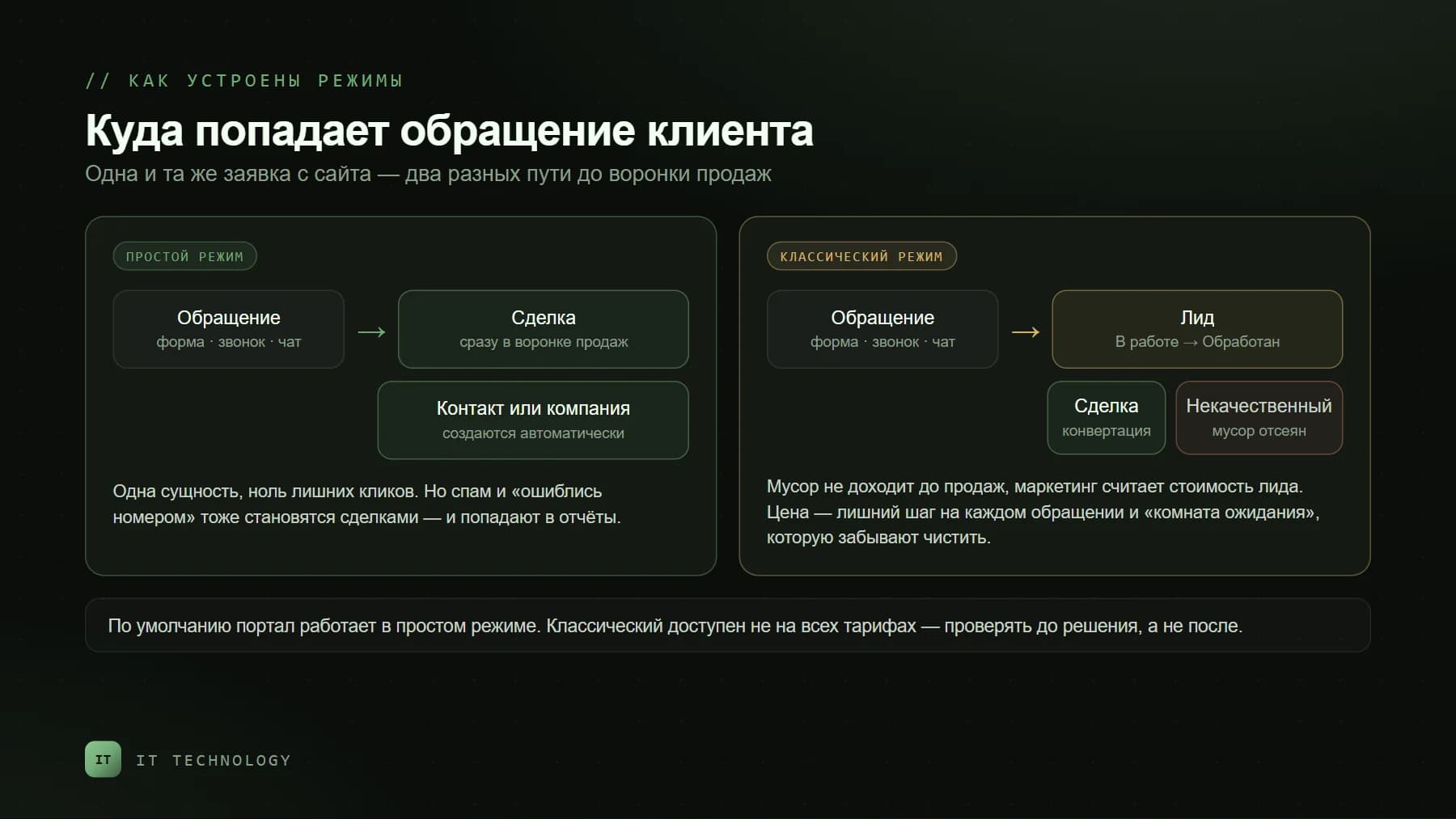
Simple mode, without leads. The Bitrix24 help desk describes it in one sentence: any request, call or email from a client immediately becomes a deal and a contact or company. There is no intermediate entity: someone writes on WhatsApp, a deal appears in the pipeline and a contact in the database. A new portal runs in this mode by default.
Classic mode, with leads. A lead is a potential client: a website form, a call, a message from social media. It lives in its own section with its own stages — by default "In progress", "Processed" and "Junk lead" — and only after a check is converted into a deal, contact and company. The point of the mode is to separate potential clients from existing ones and keep junk out of the sales pipeline.
Any request, call or email from a client immediately becomes a deal and a contact or company.
How they differ in practice
| Simple mode | Classic mode | |
|---|---|---|
| What an enquiry creates | A deal plus a contact or company — immediately | A lead; the deal and contact appear after conversion |
| Where spam and wrong numbers go | Into the sales pipeline, as deals | Stay among leads with the status "Junk" |
| Clicks to a deal | Zero | At least one: conversion |
| What a manager sees | One pipeline with everything mixed in | Two lists: leads and deals |
| What marketing measures | Cost per deal by source | Cost per lead and lead-to-deal conversion |
| Who it suits | Small sales teams | Companies with a large flow of enquiries; not on every plan |
Five signs you need leads
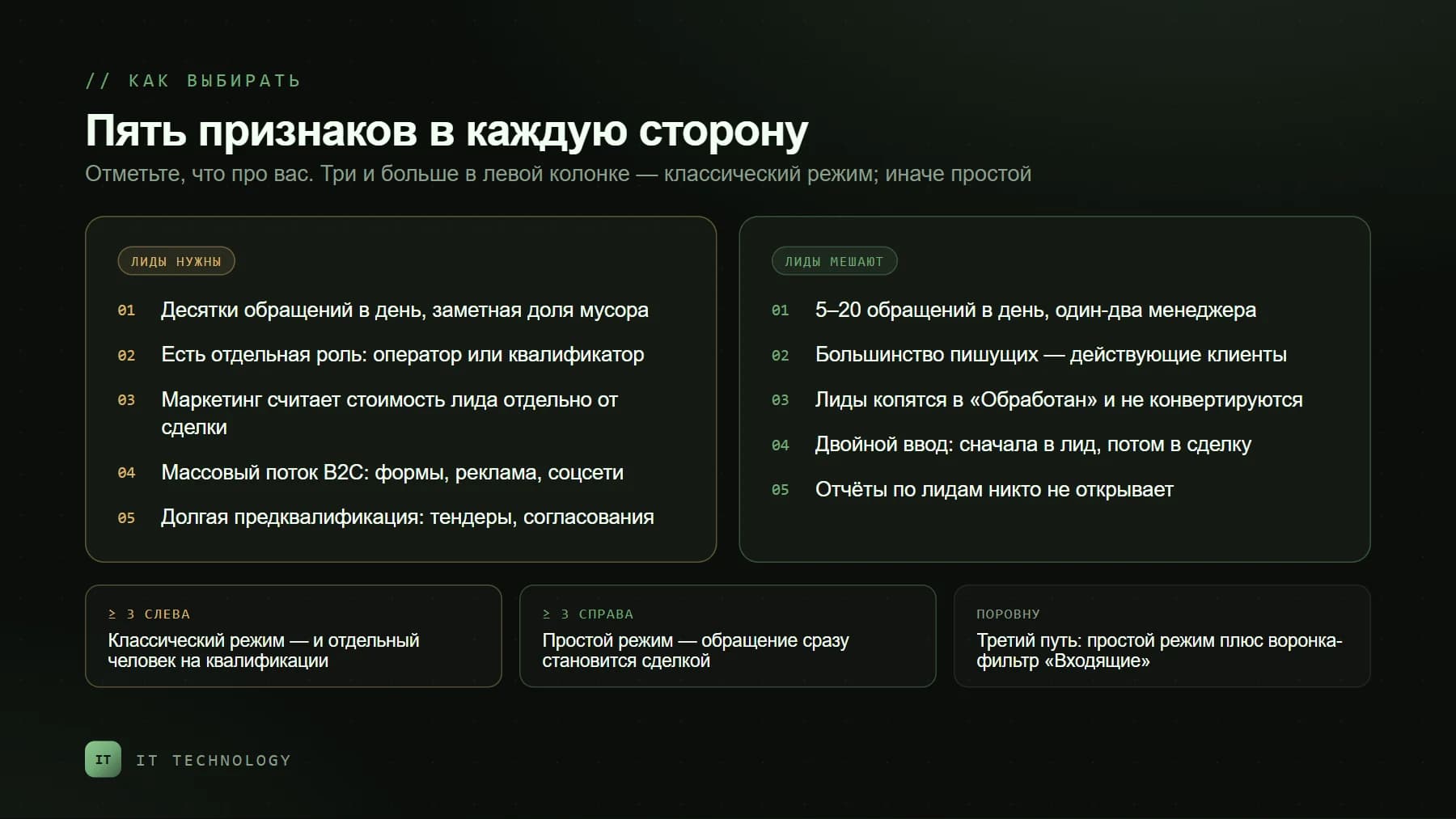
- Dozens of enquiries a day, and a noticeable share of them is junk. Form spam, wrong numbers, students with coursework. Without leads all of it becomes deals and breaks your reports.
- There is a separate role that qualifies. An operator, an assistant, a call centre — someone who takes the enquiry but does not sell. The lead is their workspace.
- Marketing measures cost per lead separately from cost per deal. That needs an entity that exists before the deal; otherwise the price of an enquiry and the price of a sale merge into one number.
- The flow is mass-market: B2C, advertising, social media. The more first-time enquiries from strangers, the more valuable a filter in front of the pipeline.
- Pre-qualification is long and formal. Tenders, procurement approvals, counterparty checks — all of this is convenient to keep in a lead without creating a deal that may never exist.
Five signs leads are getting in your way
- 5–20 enquiries a day and one or two managers. A separate "lead" step here is just an extra click on every client.
- Most people writing in are existing clients. Those are repeat leads with the "Client" field already filled; pushing them through a lead is pointless — they need a deal, or a task on an existing one.
- Leads pile up in "Processed" and nobody converts them. The section turns into a waiting room everyone forgot to clean.
- Double entry. The manager fills in the lead card, then fills in the deal fields again on conversion. A month later they stop filling in either.
- Nobody opens the lead reports. If lead-to-deal conversion is not reviewed weekly, the mode is running idle.
The third route: simple mode plus a filter pipeline
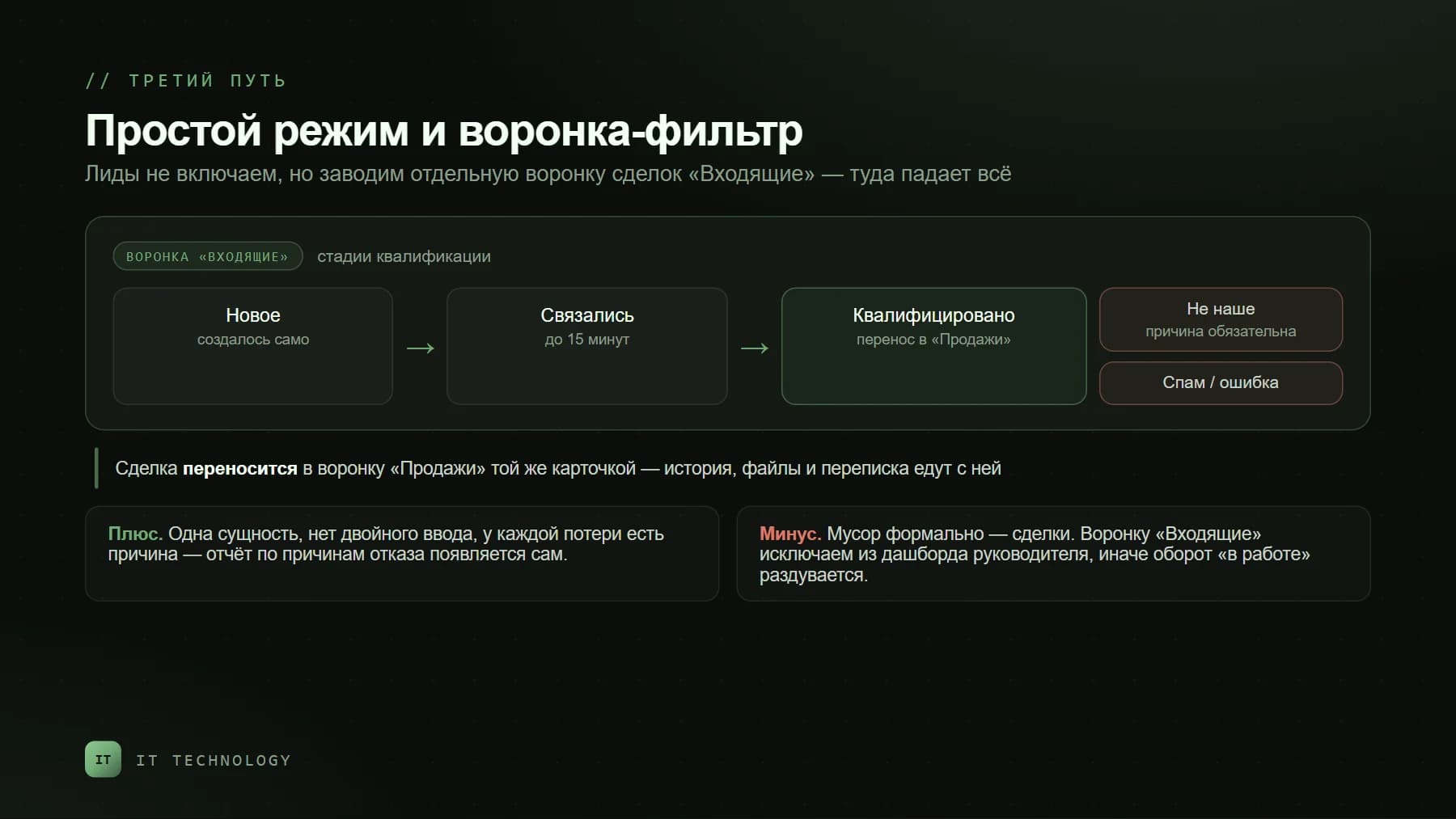
In practice you usually get a sign or two in each column, and that is where a hybrid works. Leads stay off. Instead you create a separate deal pipeline — call it "Inbound" — where everything from the website, messengers and telephony lands automatically. It has its own stages: "New", "Contacted", "Qualified", and for closing — "Not for us" and "Spam", always with a reason. A qualified deal is moved by the manager into the "Sales" pipeline — the same card, with its history and correspondence.
Pros: one entity, no double entry, and a report on rejection reasons appears by itself — just look at what "Inbound" is being closed with. One con, but an important one: junk formally remains deals. If the management dashboard is built "across all pipelines", open pipeline value inflates by the amount of spam — we covered this in why CRM turnover doesn't match 1C. The filter pipeline is explicitly excluded from management reports.
- Create an "Inbound" pipeline with four working stages and two closing reasons — no more, or it will turn into a sales pipeline of its own.
- In the settings of forms, open channels and telephony, specify that new enquiries are created in this pipeline, not in "Sales".
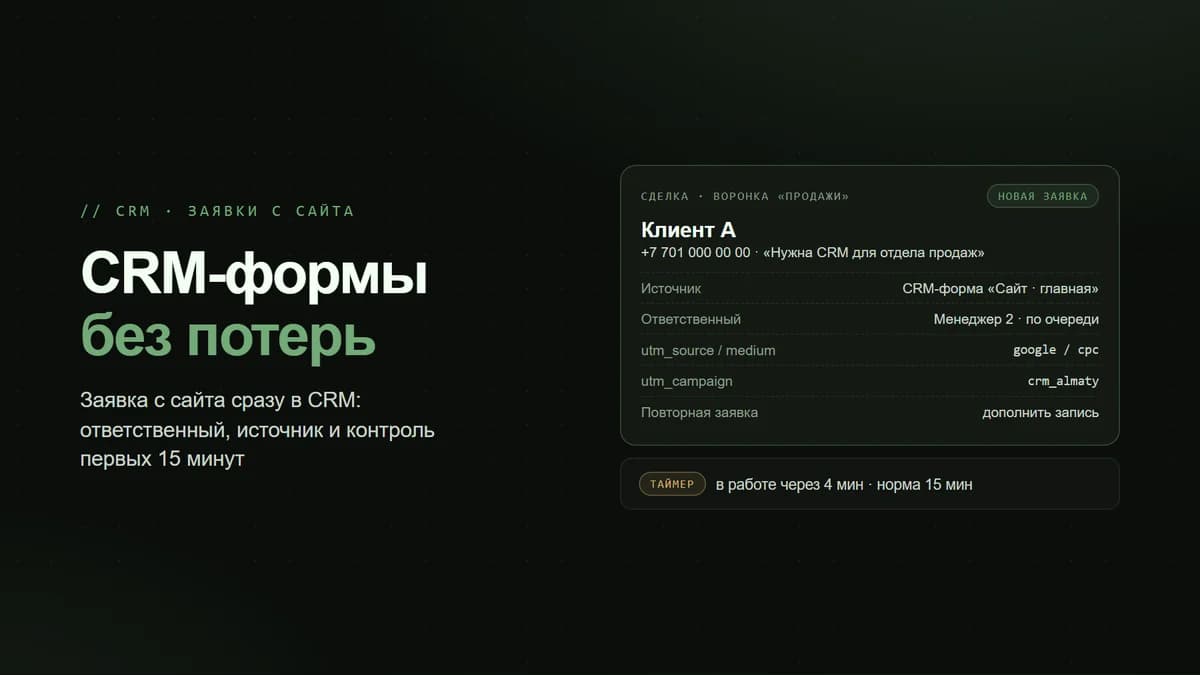
- Add a robot: a deal sitting in "New" for more than 15 minutes notifies the manager. For inbound, speed matters more than anything else.
- Make the "Rejection reason" field mandatory on closing — in a month you will have honest statistics on what comes in that is not for you.
- Exclude "Inbound" from the turnover dashboard and the sales plan; keep only the report on volume and speed.
Repeat enquiries: the trap in both modes
The most common mistake does not depend on the mode. An existing client writes "when is the shipment?" — and the system creates a new lead or a new deal, although the client already has an open one. In classic mode that is a repeat lead someone has to link; in simple mode it is a second deal on the same client or, worse, a second contact with the same number. How to find and merge such duplicates later is covered in our post on duplicate companies and contacts. The rule is simple: an enquiry from an existing client should land in their open deal, not spawn a new one — open channels and telephony settings let you choose what happens on a repeat enquiry, and that choice is worth making before launch rather than after.
How to switch, and what happens to the data
The mode is changed in CRM settings; an administrator or an employee with the permission "Allow changing CRM settings" can do it. When switching to classic, a "Leads" section is simply added to the CRM — nothing else needs configuring. When switching from classic to simple, the help desk warns plainly:
All open leads will be automatically converted into deals and clients.
In other words, the "waiting room" empties into the sales pipeline all at once — together with the spam that accumulated there. So leads are cleaned before switching: junk ones closed, repeat ones linked to clients. One more thing: classic mode is not available on every plan. Check the plan comparison before you design a process around leads.
What we set by default
If none of the signs from the first five are obvious — simple mode plus a filter pipeline. That covers most small and medium businesses in Kazakhstan: one to three managers, enquiries from WhatsApp and the website, half of the people writing in are existing clients. We switch on classic mode when three of the five signs are present, and almost always together with a dedicated person on qualification. Either way, we revisit the question once a year: the flow of enquiries changes faster than it seems.
FAQ
Which mode does a new Bitrix24 use by default?
What happens to leads if we turn classic mode off?
Can we separate junk from real enquiries without leads?
How is a repeat lead different from a regular one?
What is better for an online store?
How long does switching modes take?
If the "leads or deals" argument has been going on for months, count three numbers over one week: how many enquiries came in, how many were from existing clients, and how many turned out to be junk. Those three numbers are enough for a decision. Need a hand? Get in touch — we will look at your flow and propose a mode with a pipeline configured for it.